
- You have no items in your shopping cart
- Continue Shopping

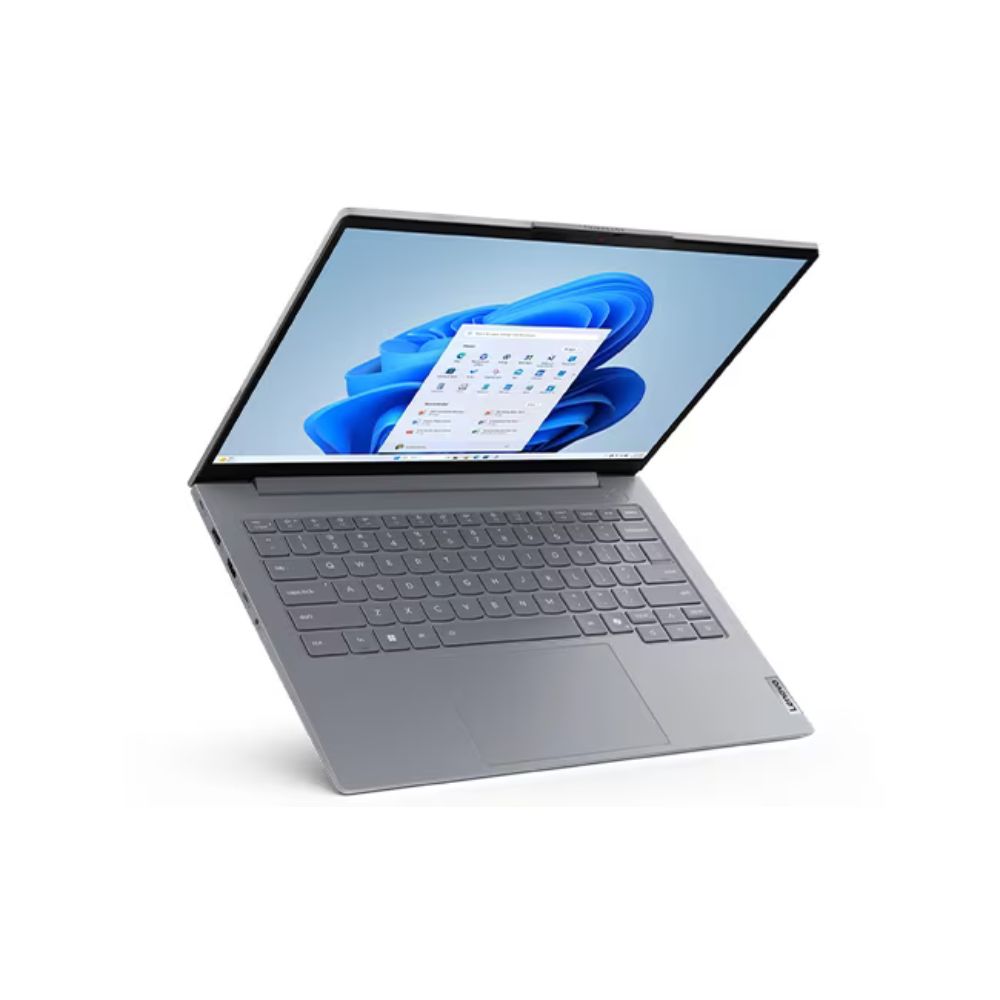
Lenovo ThinkBook 14 G8 (21SJ000YUE) Core i7 16GB RAM 512GB SSD
KSh 115,000.00
- Processor: Intel® Core Ultra 7‑255H (latest Intel Ultra series, high‑performance H‑series CPU with AI‑ready features)
- Memory: 16GB DDR5‑5600 (expandable up to 64GB)
- Storage: 512GB SSD M.2 2242 PCIe 4.0×4 NVMe
- Operating System: No OS pre‑installed (user must install Windows/Linux manually)
- Display: 14″ WUXGA (1920 × 1200) IPS, 16:10 aspect ratio
- Optical Drive: None (No ODD)
- Graphics: Integrated Intel® Graphics (Ultra platform)
- Camera: FHD 1080p webcam with privacy shutter
- Audio: Stereo speakers
- Extras: Fingerprint reader, business‑class design
- Color: Arctic Grey
- Warranty: 1 Year
Order Via WhatsApp
Lenovo ThinkBook 14 G8 (21SJ000YUE) Core Ultra 7 16GB RAM 512GB SSD Price in Kenya
The Lenovo ThinkBook 14 G8 (Model: 21SJ000YUE) represents the next generation of business computing, moving beyond standard chips to the Intel Core Ultra 7 “Meteor Lake” architecture. This laptop is specifically designed for the AI era, featuring a dedicated NPU (Neural Processing Unit) to accelerate local AI tasks without draining the battery. The Lenovo ThinkBook 14 G8 (21SJ000YUE) Price in Kenya is KSh 115,000.
Who Should Buy This Laptop? This is the ideal machine for IT professionals, creative consultants, and executives who need a future-proof device. With 16GB of fast DDR5 memory and the H-series Ultra 7 processor, it is built for heavy multitasking, data science, and AI-assisted workflows while maintaining a sleek, aluminum-topped professional look.
Lenovo ThinkBook 14 G8 (21SJ000YUE) Price Table
| Product | Model Number | Processor | RAM/SSD | Price (KSh) |
| Lenovo ThinkBook 14 G8 | 21SJ000YUE | Core Ultra 7 255H | 16GB / 512GB | KSh 115,000 |
Lenovo ThinkBook 14 G8 (21SJ000YUE) Technical Specifications
| Feature | Specification |
| Processor | Intel® Core™ Ultra 7 255H (16 Cores, 22 Threads, up to 5.1GHz) |
| AI NPU | Integrated Intel® AI Boost (AI Acceleration) |
| Memory (RAM) | 16GB DDR5-5600MHz (Upgradable to 64GB) |
| Storage | 512GB M.2 2242 PCIe 4.0 x4 NVMe SSD (Dual SSD Slots) |
| Display | 14″ WUXGA (1920 x 1200) IPS, 300 nits, 16:10, Anti-glare |
| Graphics | Integrated Intel® Arc™ Graphics |
| Operating System | Windows 11 Pro / Free DOS (Check retailer) |
| Keyboard | Backlit, English (UK) |
| Camera | FHD 1080p with Privacy Shutter |
| Ports | 1x Thunderbolt 4, 1x USB-C (10Gbps), 2x USB-A, HDMI 2.1, RJ-45, SD Card Reader |
| Battery | 45Wh with Rapid Charge Pro (50% in 30 mins) |
| Weight | 1.36 kg (2.99 lbs) |
Key Advantages of the 21SJ000YUE Model
-
AI-Ready Core Ultra 7: Unlike the standard Core i7, the Ultra 7 255H includes a dedicated AI engine. This improves background blur in video calls, enhances battery life during complex tasks, and prepares you for upcoming AI-integrated software.
-
Massive Expandability: In an era where most slim laptops have soldered memory, the ThinkBook 14 G8 features two SO-DIMM slots supporting up to 64GB RAM and two M.2 SSD slots, allowing you to add more storage without losing your current drive.
-
Enhanced Graphics: The integrated Intel Arc Graphics in the Ultra series provides a significant boost over older UHD or Iris Xe chips, making it much more capable for light video editing and graphic design.
-
Superior 16:10 IPS Display: The WUXGA resolution offers more vertical screen real estate, which is a game-changer for viewing spreadsheets or long lines of code in a 14-inch form factor.
-
Thunderbolt 4 Connectivity: Connect to high-speed docking stations, high-resolution external monitors, or fast external storage with the single-cable Thunderbolt 4 solution.
Pros and Cons
| Pros | Cons |
| Cutting-edge Core Ultra 7 with AI acceleration | 45Wh battery is modest for a high-power H-series CPU |
| High-speed 16GB DDR5 RAM included | Glossy Arctic Grey top can show fingerprints |
| Exceptional upgrade path (RAM & Storage) | |
| Thunderbolt 4 and full-size SD Card Reader |
Frequently Asked Questions
Is this an “AI PC”? Yes. It features the Intel AI Boost NPU, which categorizes it as a modern AI PC, ready for Microsoft Copilot+ features and other local AI tools.
Can I upgrade the RAM later? Yes. Unlike many competitors, this laptop has two slots. You can easily upgrade to 32GB or even 64GB in the future.
What is the difference between this and the V14 G4? The ThinkBook has a better IPS display (vs TN), a premium aluminum build, Thunderbolt 4, a backlit keyboard, and the newer Core Ultra architecture.
Conclusion
The Lenovo ThinkBook 14 G8 (21SJ000YUE) is a powerhouse that refuses to compromise. At KSh 115,000, it offers a rare combination of AI-capable processing and the kind of internal expandability that is becoming hard to find in modern laptops.
![HP EliteBook 630 G10 [i7, 8GB RAM, 512GB SSD]](https://betwantechnologies.co.ke/wp-content/uploads/2025/08/HP-EliteBook-630-G10-3-375x375.png)
![HP EliteBook 630 G10 [i7, 8GB RAM, 512GB SSD]](https://betwantechnologies.co.ke/wp-content/uploads/2025/08/HP-EliteBook-630-G10-1-375x375.png)
![HP EliteBook x360 1030 G2 7th Gen [ i5, 8GB RAM, 256GB SSD]](https://betwantechnologies.co.ke/wp-content/uploads/2025/08/1-1-375x375.jpg)
![HP EliteBook x360 1030 G2 7th Gen [ i5, 8GB RAM, 256GB SSD]](https://betwantechnologies.co.ke/wp-content/uploads/2025/08/0-1-375x375.jpg)
![HP Spectre16 x360 Touch [Intel Core i7-1360P, 16GB RAM, 512GB SSD]](https://betwantechnologies.co.ke/wp-content/uploads/2025/08/vv6-375x375.webp)
![HP Spectre16 x360 Touch [Intel Core i7-1360P, 16GB RAM, 512GB SSD]](https://betwantechnologies.co.ke/wp-content/uploads/2025/08/vv8-375x375.jpg)
![HP ZBook Fury 15 G8 [Intel Core i9-11900H, 16GB RAM, 512GB SSD]](https://betwantechnologies.co.ke/wp-content/uploads/2025/08/bb2-375x375.jpg)
![HP ZBook Fury 15 G8 [Intel Core i9-11900H, 16GB RAM, 512GB SSD]](https://betwantechnologies.co.ke/wp-content/uploads/2025/08/bb4-375x375.png)
![HP EliteBook 1040 G3 6th Gen [ i5, 8GB RAM, 256GB SSD]](https://betwantechnologies.co.ke/wp-content/uploads/2025/08/4-375x375.png)
![HP EliteBook 1040 G3 6th Gen [ i5, 8GB RAM, 256GB SSD]](https://betwantechnologies.co.ke/wp-content/uploads/2025/08/3-1-375x345.jpg)
![HP Envy [i5, 12th Gen, 8GB RAM, 512GB SSD]](https://betwantechnologies.co.ke/wp-content/uploads/2025/08/HP-Envy-Core-i5-12th-Gen-8GB-RAM-512GB-SSD-1-375x375.jpg)
![HP Envy [i5, 12th Gen, 8GB RAM, 512GB SSD]](https://betwantechnologies.co.ke/wp-content/uploads/2025/08/HP-Envy-Core-i5-12th-Gen-8GB-RAM-512GB-SSD-2-375x375.jpg)
![HP OmniBook Flip 5 [i7, 16GB RAM, 512GB SSD]](https://betwantechnologies.co.ke/wp-content/uploads/2025/08/HP-OmniBook-Flip-5-i7-16GB-RAM-512GB-SSD-375x375.jpg)
![HP OmniBook Flip 5 [i7, 16GB RAM, 512GB SSD]](https://betwantechnologies.co.ke/wp-content/uploads/2025/08/HP-OmniBook-Flip-5-i7-16GB-RAM-512GB-SSD-1-375x375.jpg)
![Asus VivoBook E1404G [i3, 8 GB RAM, 512 GB SSD]](https://betwantechnologies.co.ke/wp-content/uploads/2025/08/w800-375x375.png)
![Asus VivoBook E1404G [i3, 8 GB RAM, 512 GB SSD]](https://betwantechnologies.co.ke/wp-content/uploads/2025/08/w800-1-375x375.png)