- You have no items in your shopping cart
- Continue Shopping


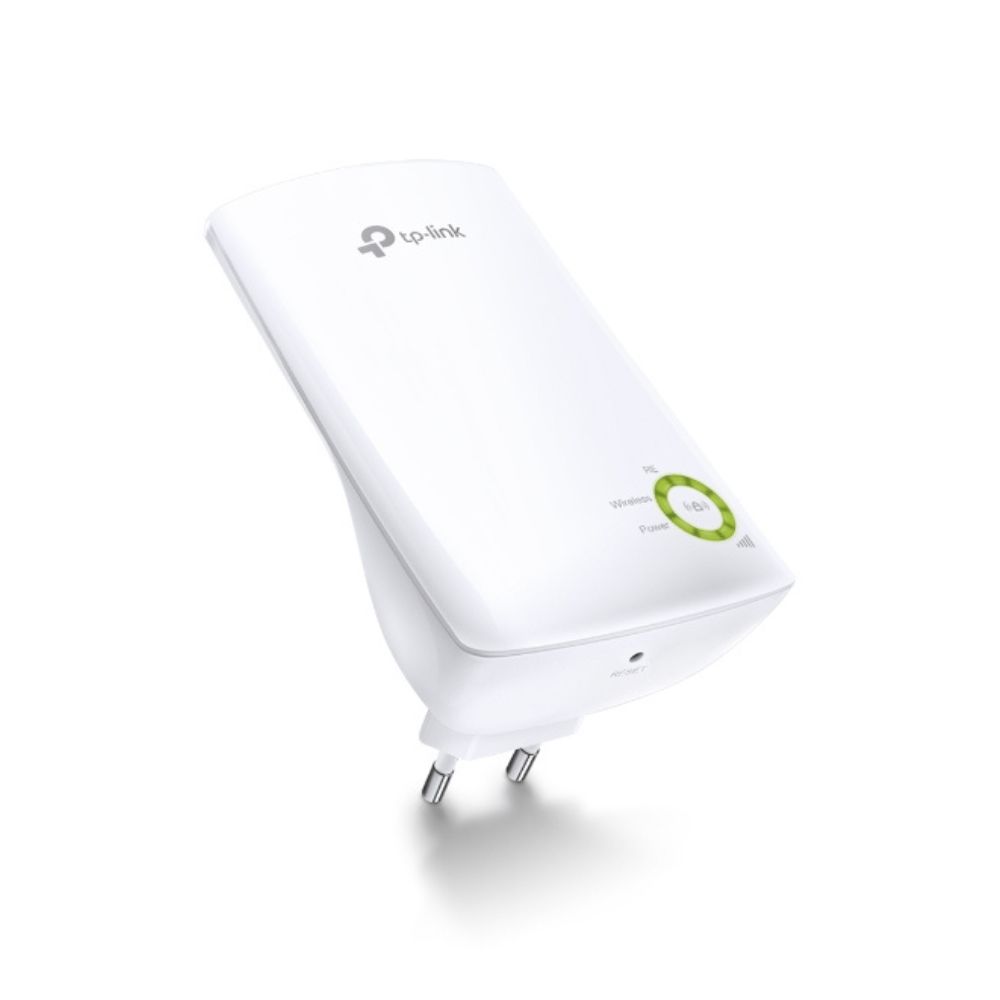
TP-Link 300Mbps Wi-Fi Range Extender – TL-WA854RE
KSh 2,900.00
TP-Link 300Mbps Wi-Fi Range Extender – TL-WA854RE Key Features
- 300 Mbps Wireless Speed: Smooth browsing, streaming, and light gaming.
- Range Extension: Expands Wi-Fi coverage to eliminate dead zones.
- Compact Design: Wall-mounted style blends into any environment.
- Smart Signal Indicator: Helps find the best placement for optimal coverage.
- Easy Setup: One-touch WPS button for quick installation.
- Universal Compatibility: Works with any standard Wi-Fi router.
Order Via WhatsApp
TP-Link 300Mbps Wi-Fi Range Extender – TL-WA854RE Overview
The TP-Link 300Mbps Wi-Fi Range Extender – TL-WA854RE is a compact device designed to boost your existing Wi-Fi coverage. It helps eliminate dead zones by extending the signal from your router, ensuring stable connectivity across your home or office. Its plug-and-play design makes it easy to install and manage.
TP-Link 300Mbps Wi-Fi Range Extender – TL-WA854RE Specifications
| Component | Details |
|---|---|
| Model | TL-WA854RE |
| Wireless Standard | Wi-Fi 4 (802.11n) |
| Speed | Up to 300 Mbps |
| Bands | 2.4GHz only |
| Antennas | Internal |
| Ports | None (wireless-only extender) |
| Security | WPA/WPA2 |
| Dimensions | 110 × 65.8 × 75.2 mm |
TP-Link 300Mbps Wi-Fi Range Extender – TL-WA854RE Price in Kenya
| Product Description | Price Range (KES) |
|---|---|
| TP-Link 300Mbps Wi-Fi Range Extender – TL-WA854RE | KSh 2,500 – 3,500 |
TP-Link 300Mbps Wi-Fi Range Extender – TL-WA854RE Performance
- Provides stable Wi-Fi coverage in hard-to-reach areas.
- Best suited for browsing, social media, and light streaming.
- Compact design makes it easy to reposition for optimal signal.
TP-Link 300Mbps Wi-Fi Range Extender – TL-WA854RE Ideal Use Cases
- Apartments: Extend Wi-Fi to bedrooms or balconies.
- Small Homes: Eliminate dead zones in kitchens or garages.
- Offices: Ensure stable connectivity in meeting rooms.
- Travel Use: Portable design for temporary setups.
TP-Link 300Mbps Wi-Fi Range Extender – TL-WA854RE Pros and Cons
| Pros | Cons |
|---|---|
| Affordable and compact | Limited to Wi-Fi 4 (802.11n) |
| Easy plug-and-play setup | Single-band (2.4GHz only) |
| Smart signal indicator for placement | No Ethernet port for wired devices |
| Works with any router | Lower speeds compared to Wi-Fi 5/6 extenders |
TP-Link 300Mbps Wi-Fi Range Extender – TL-WA854RE FAQs
1. Does it support 5GHz Wi-Fi? No, it only supports 2.4GHz Wi-Fi.
2. Can it connect wired devices? No, it does not have Ethernet ports.
3. Is it suitable for gaming? It can handle casual gaming but may not provide the low latency required for competitive gaming.
4. How do I set it up? Simply plug it in, press the WPS button on your router, then press the WPS button on the extender.
5. Can I use it with any router? Yes, it is universally compatible with standard Wi-Fi routers.